Automated PR Scanning
The Conviso Platform Automated PR Scanning provides instant security feedback directly within your GitHub Pull Requests. unlike traditional CI/CD setups that require manual pipeline configuration, this feature is fully managed and automated.
When a developer opens or updates a Pull Request, the Conviso Platform automatically detects the changes and analyzes only the modified files. This ensures rapid feedback, allowing developers to identify and fix security issues before code is merged.
Key Benefits
- Zero Configuration: No need to write YAML files, configure GitHub Actions, or set up CI/CD pipelines in every repository.
- Speed: The scanner uses differential analysis, focusing strictly on changed files to deliver results in minutes.
- Native Integration: Security findings appear as comments directly in the PR, and status checks can automatically block merges if critical issues are found.
- Secure Execution: Scans run in an ephemeral, isolated environment managed by Conviso, preserving your CI/CD minutes.
Prerequisites
Before enabling PR Scanning, ensure that:
- You have successfully configured the basic GitHub Integration.
- You have Administrator access to the Conviso Platform to adjust integration settings.
- Your repositories are Mapped to Assets within the Conviso Platform.
Enabling PR Scanning
To activate automated scanning for your organization:
Step 1 - Access Integration Settings
Navigate to the Integrations page in the Conviso Platform, open GitHub, and click the pencil icon (Configure connection) on the connection of the organization whose pull requests you want to scan.
PR Scanning is configured per GitHub connection. If your company connects several organizations, enable it on each connection that should scan pull requests.
Step 2 - Activate the Feature
Scroll to the configuration section and toggle Pull Request Scanning to On.
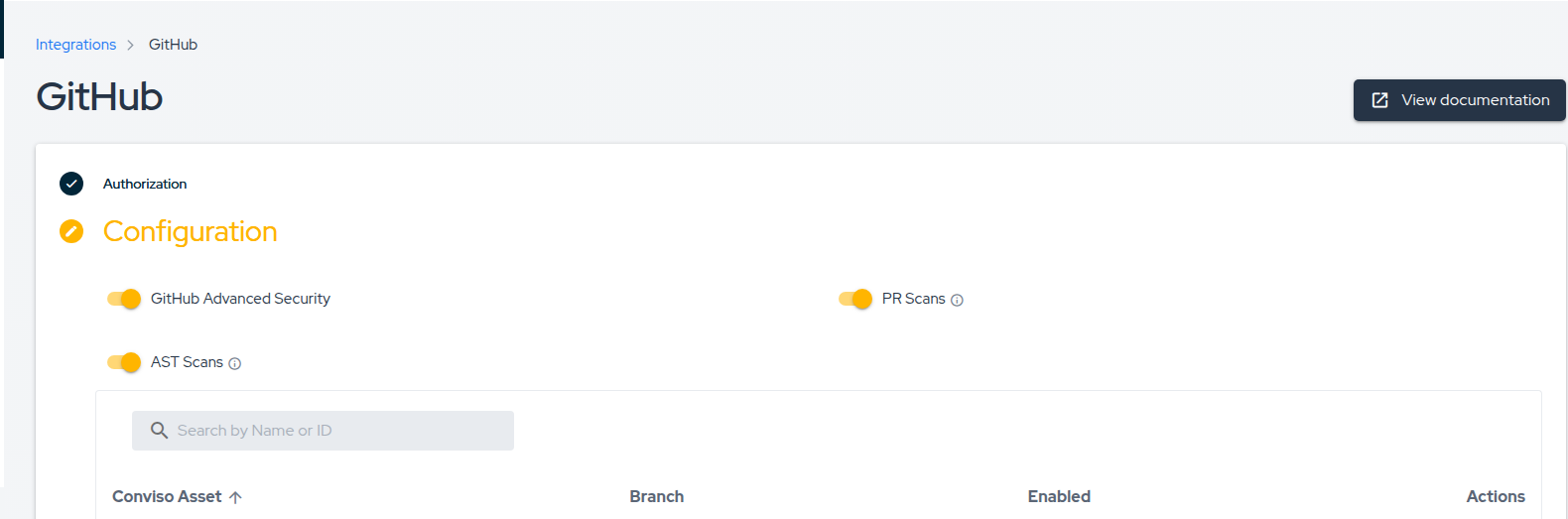
Step 3 - Repository Level Control
Once the global setting is enabled, you can control which specific repositories are scanned via the Asset Mapping table on the integration page.
- Enable Scanning: Ensure the Status toggle is active for the specific asset/repository.
- Disable Scanning: If you disable a specific repository mapping, PRs for that repository will be ignored.
Changes to these settings take effect immediately for all new Pull Requests or new commits pushed to existing PRs.
The Developer Workflow
Once enabled, the security workflow integrates seamlessly into the developer's daily routine.
1. Triggering a Scan
The process begins automatically when a developer:
- Opens a new Pull Request.
- Pushes new commits to an existing Pull Request.
2. Status Checks
Immediately after the PR is updated, a Conviso Security Check will appear in the PR timeline with a status of Pending.
We recommend configuring your GitHub Branch Protection Rules to require the Conviso Security Check to pass before merging. This ensures no critical vulnerabilities are introduced into your main branch.
3. Reviewing Results
Once the scan is complete (typically within a few minutes), the status check will update:
- ✅ Success: No vulnerabilities were found.
- ❌ Failure: Vulnerabilities were detected.
In addition to the status check, the Conviso Bot will post a detailed comment on the PR summarizing the findings.
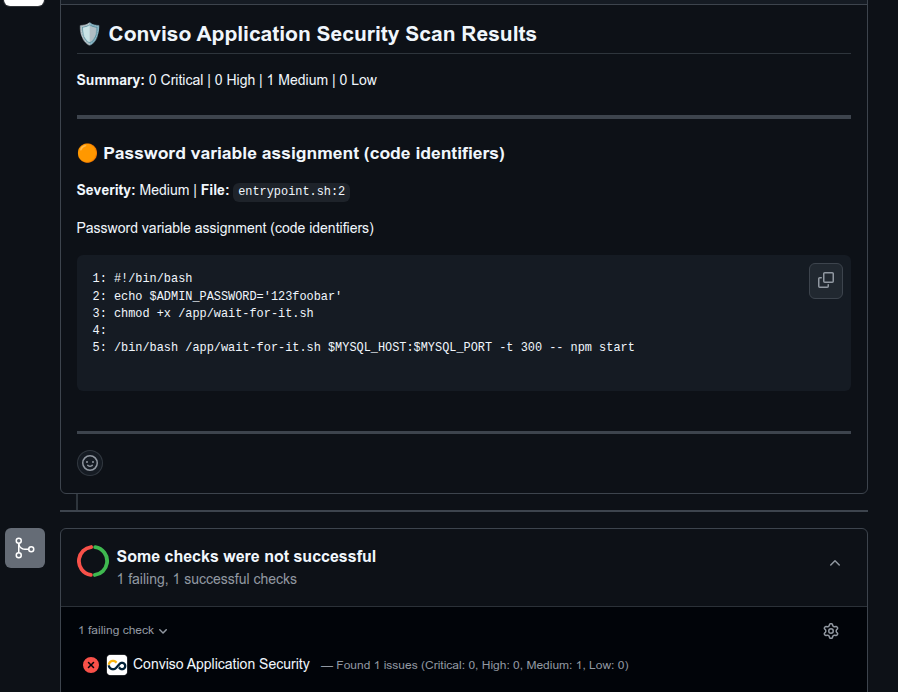
The comment provides:
- Summary: A count of Critical, High, Medium, and Low issues.
- Evidence: The specific file path, line number, and a snippet of the code causing the vulnerability.
- Description: An explanation of the vulnerability type (e.g., SQL Injection, Hardcoded Secret) to help the developer understand the risk.
4. Remediation
Because feedback is provided immediately:
- The developer reads the finding in the PR comment.
- They push a fix to the branch.
- The system automatically detects the update and re-scans the code.
- If the issue is resolved, the status turns Green.
FAQ
Automated Scanning vs. AST Orchestrator
The Conviso Platform offers two ways to scan GitHub repositories. Choose the one that fits your needs:
| Feature | Automated PR Scanning | AST Orchestrator |
|---|---|---|
| Setup | Zero Config (Toggle On) | Low Config (Requires YAML file) |
| Execution Environment | Conviso Cloud (SaaS) | Your GitHub Actions Runners |
| Cost | Included in Platform | Consumes your GitHub Action Minutes |
| Scan Scope | Differential (Changed files only) | Full Scan (Entire repository) |
| Use Case | Rapid feedback during Code Review | Deep analysis & Compliance |
Automated PR Scanning is designed for speed and "Shift-Left" security during the code review process. It does not replace the need for occasional full-repository scans, which can be handled by the Orchestrator or Scheduled Scans.
Why are checks or comments not appearing in my PR?
If you opened a PR but do not see the "Conviso Security Check" or any comments from the bot, please verify the following:
- Is the feature enabled? Go to Integrations → GitHub in Conviso Platform, open the connection of the repository's organization, and confirm that Pull Request Scanning is toggled On. Each connection has its own setting.
- Is the specific repository allowed? Check the "Asset Mapping" table in the integration settings. The specific repository must be mapped to an asset, and its Status toggle must be active.
- Are permissions correct? Ensure the installed Conviso Application Security GitHub App has the necessary permissions (specifically
readandwriteaccess to Pull Requests and Commit Statuses). You may need to update the app permissions in your GitHub Organization settings.
I already have a pipeline step running Conviso AST. What happens if I enable PR Scanning?
They operate independently. Automated PR Scanning triggers exclusively on Pull Request events (via the GitHub App), while your existing CI/CD pipeline triggers based on your YAML configuration (e.g., on: push or on: pull_request).
If your pipeline is also configured to run on PRs, both might run simultaneously. This is okay and often desired:
- PR Scanning provides immediate, focused feedback on the "diff" directly in the PR interface.
- Pipeline AST ensures compliance and might run a full repository scan or specific policies required for deployment.
You can choose to keep both for maximum coverage or adjust your pipeline to run only on the main branch (e.g., on: push to main/master) if you want to avoid duplicate checks during Code Review.
Support
If scans are not triggering or you are receiving unexpected errors, please verify that your GitHub App permissions are up to date, or contact our support team for assistance.
Contribute to the Docs
Found something outdated or missing? Help us improve the documentation with a quick suggestion or edit.
How to contributeResources
By exploring our content, you'll find resources that will enhance your understanding of the importance of a Security Application Program.
Conviso Blog: Explore our blog, which offers a collection of articles and posts covering a wide range of AppSec topics. The content on the blog is primarily in English.
Conviso's YouTube Channel: Access a wealth of informative videos covering various topics related to AppSec. Please note that the content is primarily in Portuguese.