Vulnerability KPI
Overview
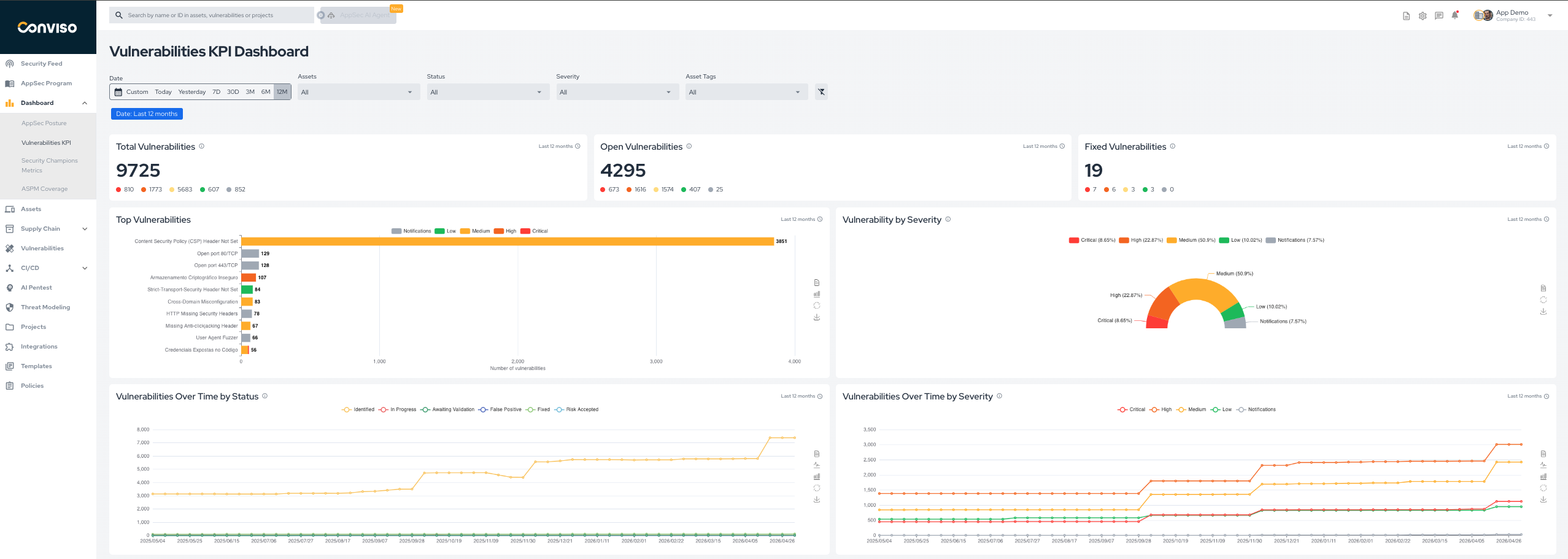
The Vulnerability KPI dashboard highlights the main indicators for vulnerability volume, severity distribution, and evolution over time.
It helps teams answer questions such as:
- how many vulnerabilities are currently open;
- how many were fixed in the selected period;
- which vulnerability types are most common;
- whether the backlog is growing or stabilizing over time.
Main Metrics
The dashboard includes the following key views:
- Total Vulnerabilities: total number of vulnerabilities in the selected scope.
- Open Vulnerabilities: vulnerabilities currently in active statuses such as
Identified,In Progress, andAwaiting Validation. - Fixed Vulnerabilities: vulnerabilities currently in the
Fixedstatus. - Top Vulnerabilities: the most frequent vulnerability types in the selected scope.
- Vulnerability by Severity: the current distribution of vulnerabilities by severity.
- Vulnerabilities Over Time by Status: how vulnerability volume changes over time by workflow status.
- Vulnerabilities Over Time by Severity: how vulnerability volume changes over time by severity.
For status meanings and lifecycle rules, see Workflow Status.
Filters
Use the dashboard filters to refine the analysis by:
- date range;
- assets;
- vulnerability status;
- severity;
- asset tags.
Example
Contribute to the Docs
Found something outdated or missing? Help us improve the documentation with a quick suggestion or edit.
How to contributeResources
By exploring our content, you'll find resources that will enhance your understanding of the importance of a Security Application Program.
Conviso Blog: Explore our blog, which offers a collection of articles and posts covering a wide range of AppSec topics. The content on the blog is primarily in English.
Conviso's YouTube Channel: Access a wealth of informative videos covering various topics related to AppSec. Please note that the content is primarily in Portuguese.