Find and Manage Your Threat Models
Threat Modeling Artifacts is the home of the module: every threat model your company has created lives here.
Objective
By the end of this guide, you will have:
- Located a specific threat model using search and filters.
- Understood what each column of the list tells you.
- Opened an artifact to continue working on it.
Prerequisites
- Access to the Threat Modeling module in the left-hand menu.
Steps
Step 1 – Open the artifact list
- In the left-hand menu, click Threat Modeling.
Step 1: Artifact list with search, filters, and the Create threat model button.
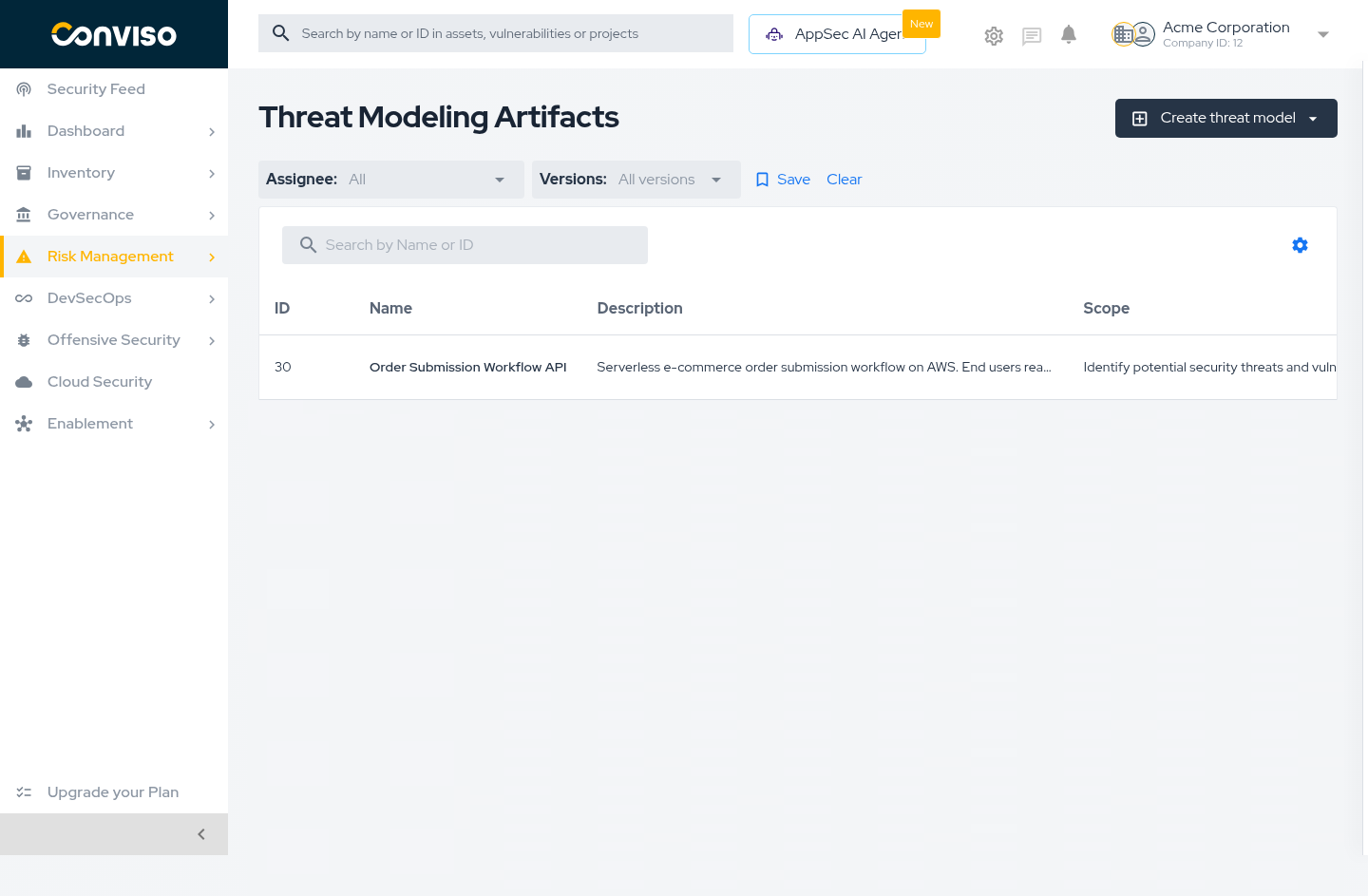
Each row is one threat model:
| Column | What it means |
|---|---|
| ID | The artifact identifier. The copy icon puts it on your clipboard. |
| Name | The system being modeled. Click it to open the artifact. |
| Description | The system as it was described. |
| Scope | What the model covers. |
| Assigned user | Who owns it. |
| Latest version | v1, v2, and so on. |
| Last updated | When the most recent version was generated. |
| Actions | Per-artifact operations. |
Step 2 – Find a specific model
- Use search to filter by name or ID.
- Use the Assignee filter to see only the models a given person owns.
- Use the Versions filter to narrow the list.
- Click Save to keep a filter combination, or Clear to reset it.
Step 3 – Open the artifact
- Click the artifact name to open it and review its versions and requirements.
The Latest version column is a quick health check. Models still at v1 long after their system changed are the ones worth revisiting.
Validation
| Check | Expected result |
|---|---|
| The list loads | Artifacts appear with their IDs, names, and latest versions. |
| Applying a filter | Only matching artifacts remain listed. |
| Clicking a name | The artifact page opens with its details and version history. |
Troubleshooting
| Problem | What to do |
|---|---|
| The list is empty | No threat model has been created yet. See Create a Threat Model. |
| An expected model is missing | Clear the filters and search by ID. Confirm you are in the correct company. |
| Create threat model is not visible | Your user lacks permission to create artifacts in this company. |
Next steps
Support
Should you have any questions or require assistance while using the Conviso Platform, feel free to reach out to our dedicated support team.
Contribute to the Docs
Found something outdated or missing? Help us improve the documentation with a quick suggestion or edit.
How to contributeResources
By exploring our content, you'll find resources that will enhance your understanding of the importance of a Security Application Program.
Conviso Blog: Explore our blog, which offers a collection of articles and posts covering a wide range of AppSec topics. The content on the blog is primarily in English.
Conviso's YouTube Channel: Access a wealth of informative videos covering various topics related to AppSec. Please note that the content is primarily in Portuguese.