Create a PCI Assessment
Overview
An assessment is the unit of work you evaluate against a PCI standard. Creating one is a two-step decision: which framework you are assessing against, and how much of it (the scope). Both choices shape the control catalogue you will answer.
From Compliance → PCI → Assessments, click New assessment, then give the assessment
a title (for example PCI DSS Q1 2026).
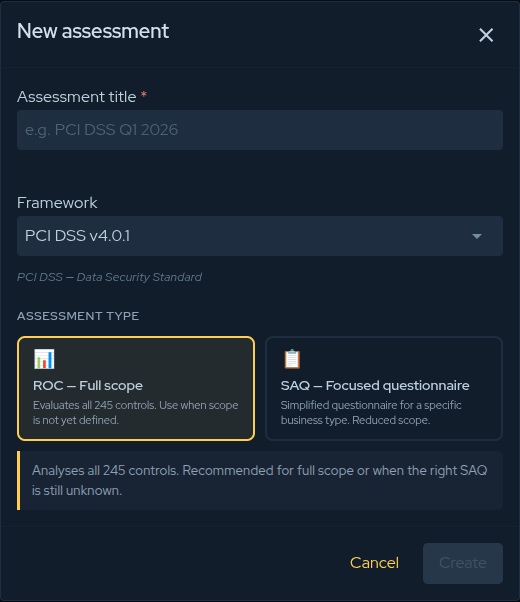
Step 1 — Choose the framework
The Framework selector lists every supported PCI standard. Pick the one that matches what you are being assessed for; the dialog then shows the scope options that apply to it.
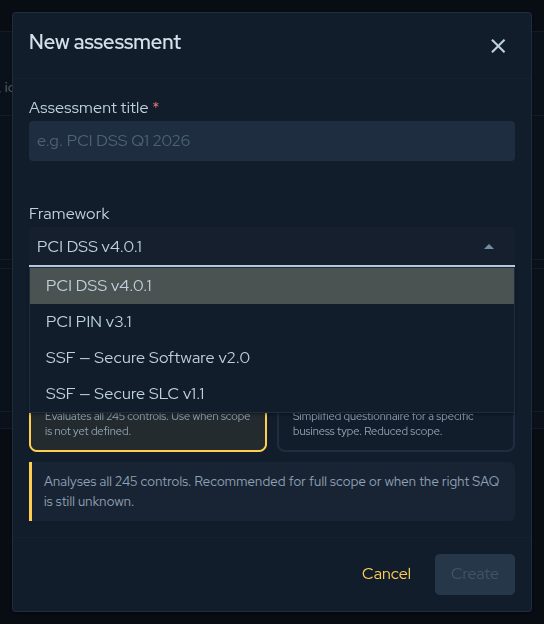
| Framework | Choose it when… |
|---|---|
| PCI DSS v4.0.1 | You store, process, or transmit cardholder data and need a DSS validation. |
| PCI PIN v3.1 | You are an acquirer, processor, or HSM/ATM operator handling PIN data. |
| SSF — Secure Software v2.0 | You are validating a payment software product. |
| SSF — Secure SLC v1.1 | You are validating your software development lifecycle. |
Step 2 — Choose the scope
PCI DSS
PCI DSS offers two paths:
-
ROC — Full scope — evaluates all 245 controls. Use it for a complete Report on Compliance, when scope is not yet defined, or when you are unsure which SAQ applies.
-
SAQ — Focused questionnaire — a reduced control set tailored to a specific business type. When you pick SAQ, select which SAQ applies:
SAQ Applies to A Card-not-present e-commerce, fully outsourced to a validated TPSP. A-EP E-commerce whose site can affect payment-data security (JS posting to a TPSP). B Imprint machines or standalone dial-out terminals, no electronic CHD storage. B-IP Standalone IP-connected POI devices approved as PTS POI. C Internet-connected payment-application systems, no e-commerce. C-VT Web-based virtual terminal on a single isolated computer. D (Merchant) Merchants who do not qualify for any other SAQ — full DSS scope. D (Service Provider) Service providers eligible for SAQ (no ROC required). P2PE Hardware terminals in a PCI-listed P2PE solution. SPoC PCI-listed SPoC — software-based PIN entry on COTS devices.
PCI PIN
Choose how the assessment is performed:
- Self-Assessment — internal self-attestation AOC.
- QPA-assessed — a formal assessment by a Qualified PIN Assessor.
PCI SSF (Secure Software / Secure SLC)
Each SSF standard is assessed against its full control set — there are no reduced scopes to choose. Select the framework and continue.
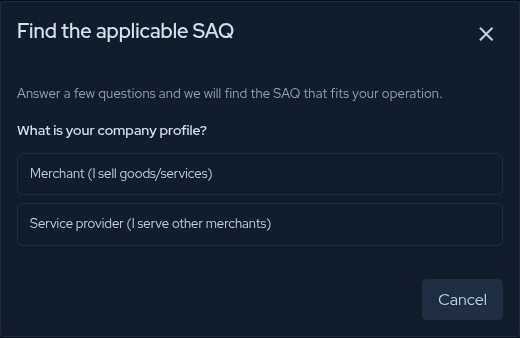
Not sure which SAQ? Use the wizard
For PCI DSS, if you are unsure which SAQ fits your operation, choose SAQ and click “Not sure which SAQ — help me choose.” The wizard asks about your company profile, how customers pay, who processes card data at checkout, and your equipment, then recommends the applicable SAQ and fills it in for you.
When the form is complete, click Create to open the assessment and start answering controls.
Not certain about your scope yet? Start with PCI DSS → ROC — Full scope. You see the complete control set and can narrow down on a later assessment.
Contribute to the Docs
Found something outdated or missing? Help us improve the documentation with a quick suggestion or edit.
How to contributeResources
By exploring our content, you'll find resources that will enhance your understanding of the importance of a Security Application Program.
Conviso Blog: Explore our blog, which offers a collection of articles and posts covering a wide range of AppSec topics. The content on the blog is primarily in English.
Conviso's YouTube Channel: Access a wealth of informative videos covering various topics related to AppSec. Please note that the content is primarily in Portuguese.