Gap Analysis & Finalizing
Overview
Answering controls produces data; the Assessment dashboard turns it into a picture you can act on. Open it from the Dashboard action inside any assessment to get a consolidated view of answers, compliance per requirement, and open gaps. It is the fastest way to see where you stand and what to remediate first, and it works the same way for every framework — PCI DSS, PCI PIN, or SSF.
Reading the dashboards
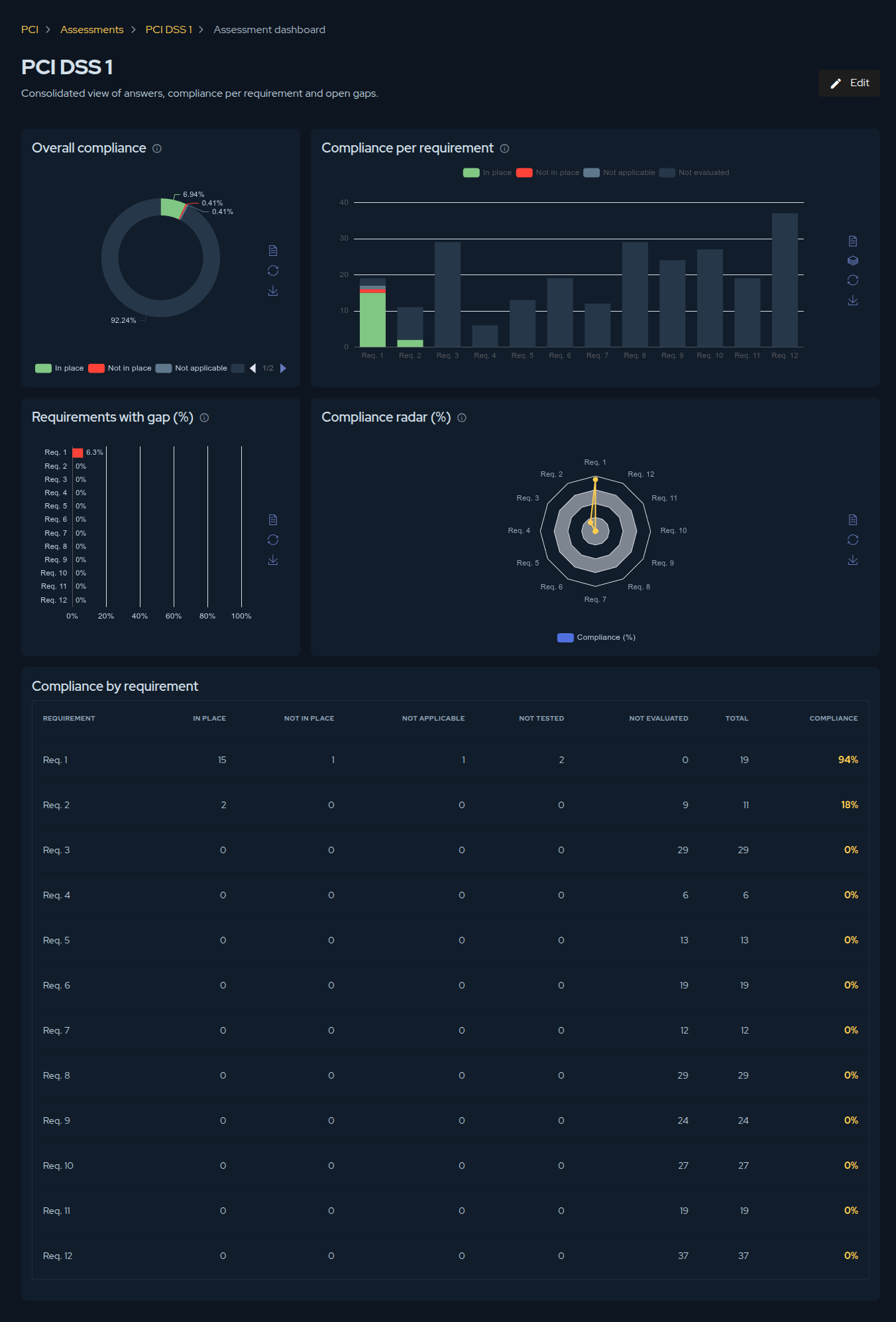
The page is built from five complementary views, each answering a different question:
- Overall compliance — a donut showing how all controls are distributed across the findings: In place, Not in place, Not applicable, and Not evaluated. Your headline number at a glance.
- Compliance per requirement — a stacked bar showing the share of each finding within every requirement, so you can see which requirements are healthy and which are mostly unanswered.
- Requirements with gap (%) — the percentage of Not in place controls per requirement. This is your prioritisation view: the tallest bars are where the real gaps are.
- Compliance radar (%) — the per-requirement compliance percentage in a radar shape, useful for spotting an unbalanced profile across requirements.
- Compliance by requirement — the underlying table with the count of each finding, the total, and the compliance percentage per requirement.
Each panel can be exported from its own actions, so the charts can go straight into a report or a steering-committee deck.
Finalizing an assessment
When the work is complete, click Finalize to lock the assessment as a point-in-time record. Finalizing changes its nature:
- The assessment becomes read-only — answers and evidence are frozen.
- The action is irreversible. Afterwards the only lifecycle action available is archive, which keeps the record but moves it out of your active list.
You cannot finalize while controls are still unanswered, or while a justification is missing for any Not applicable or Not tested answer. The platform lists exactly what is blocking so you can resolve those items first.
A finalized assessment is what feeds the History and Trend KPIs on the PCI dashboard: each one is a snapshot, and comparing snapshots is how you demonstrate that compliance is improving over time.
Contribute to the Docs
Found something outdated or missing? Help us improve the documentation with a quick suggestion or edit.
How to contributeResources
By exploring our content, you'll find resources that will enhance your understanding of the importance of a Security Application Program.
Conviso Blog: Explore our blog, which offers a collection of articles and posts covering a wide range of AppSec topics. The content on the blog is primarily in English.
Conviso's YouTube Channel: Access a wealth of informative videos covering various topics related to AppSec. Please note that the content is primarily in Portuguese.