Turn Requirements into a Project
A threat model nobody acts on is a document. This guide turns it into work: the platform creates a project from the requirements generated for each part of your architecture, so your team can assign, track, and evidence each one.
Objective
By the end of this guide, you will have:
- Created a project from the latest version of a threat model.
- Located the security requirements and activities generated for each architecture item.
- Understood how to move activities through their statuses and attach evidence.
Prerequisites
- A threat modeling artifact with at least one version. See Create a Threat Model.
- Permission to create projects in your company.
Steps
Step 1 – Create the project
- Open the artifact in Threat Modeling.
- Click Create project from latest version.
- Enter the Project Name.
- Select the Start date and End date from the calendar.
- Fill in the Goal and the Scope and limitations.
- Review Requirement Templates and remove any architecture item you do not want to work on now.
- Click Create a new project.
Step 1: Project form opened from the artifact, with Project Type set to Threat Modeling and one requirement template per architecture item.
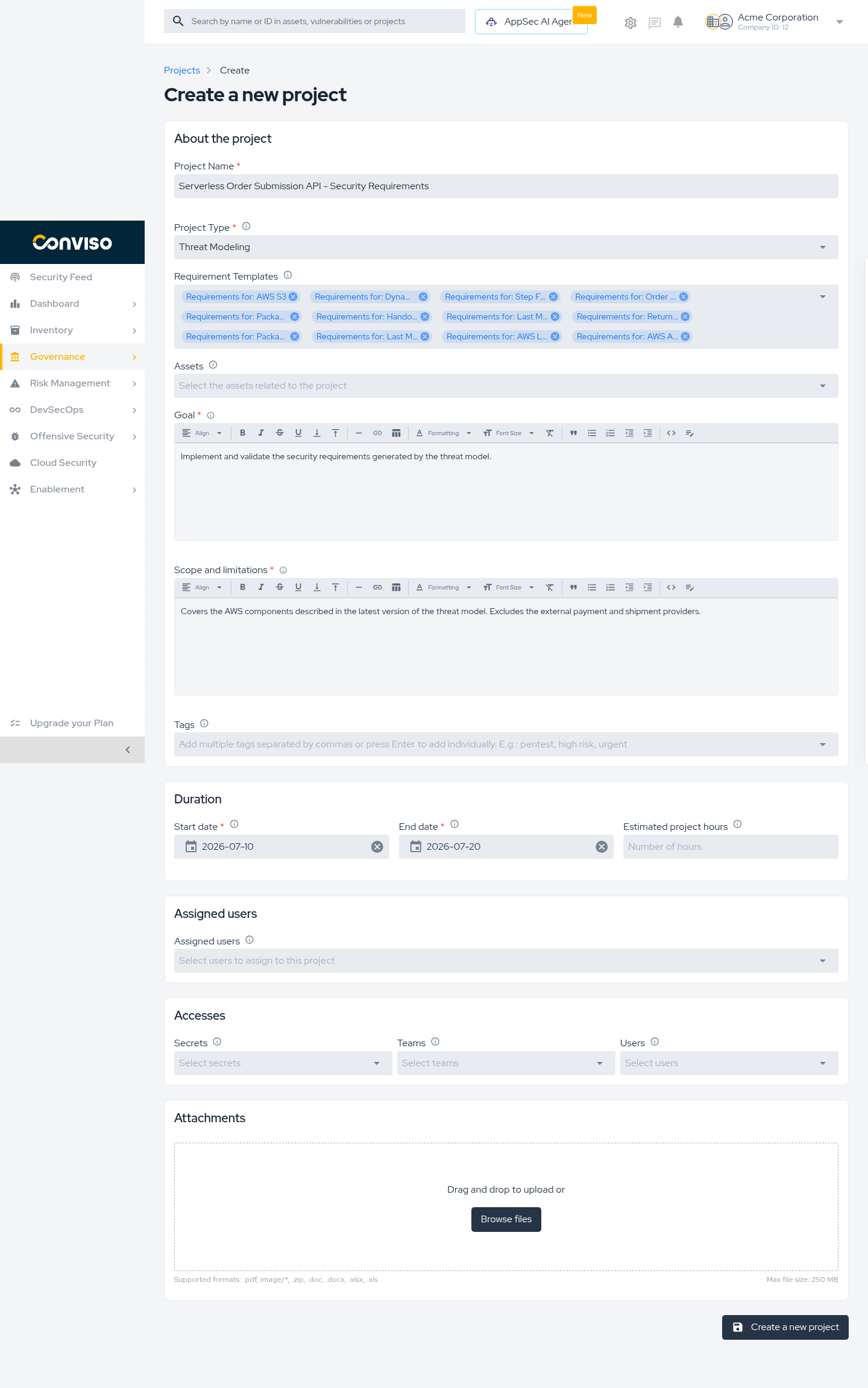
The platform pre-fills Project Type as Threat Modeling and lists one requirement template per architecture item found in the model.
| Field | Required |
|---|---|
| Project Name | Yes |
| Start date and End date | Yes |
| Goal | Yes |
| Scope and limitations | Yes |
| Assets, Tags, Assigned users, Teams, Attachments | No |
Step 2 – Open the generated requirements
- Open the project from Projects.
- Select the Requirements tab.
- Click a requirement group to expand it.
Step 2: Requirements tab listing one group per architecture item, with a group expanded to show its activities.
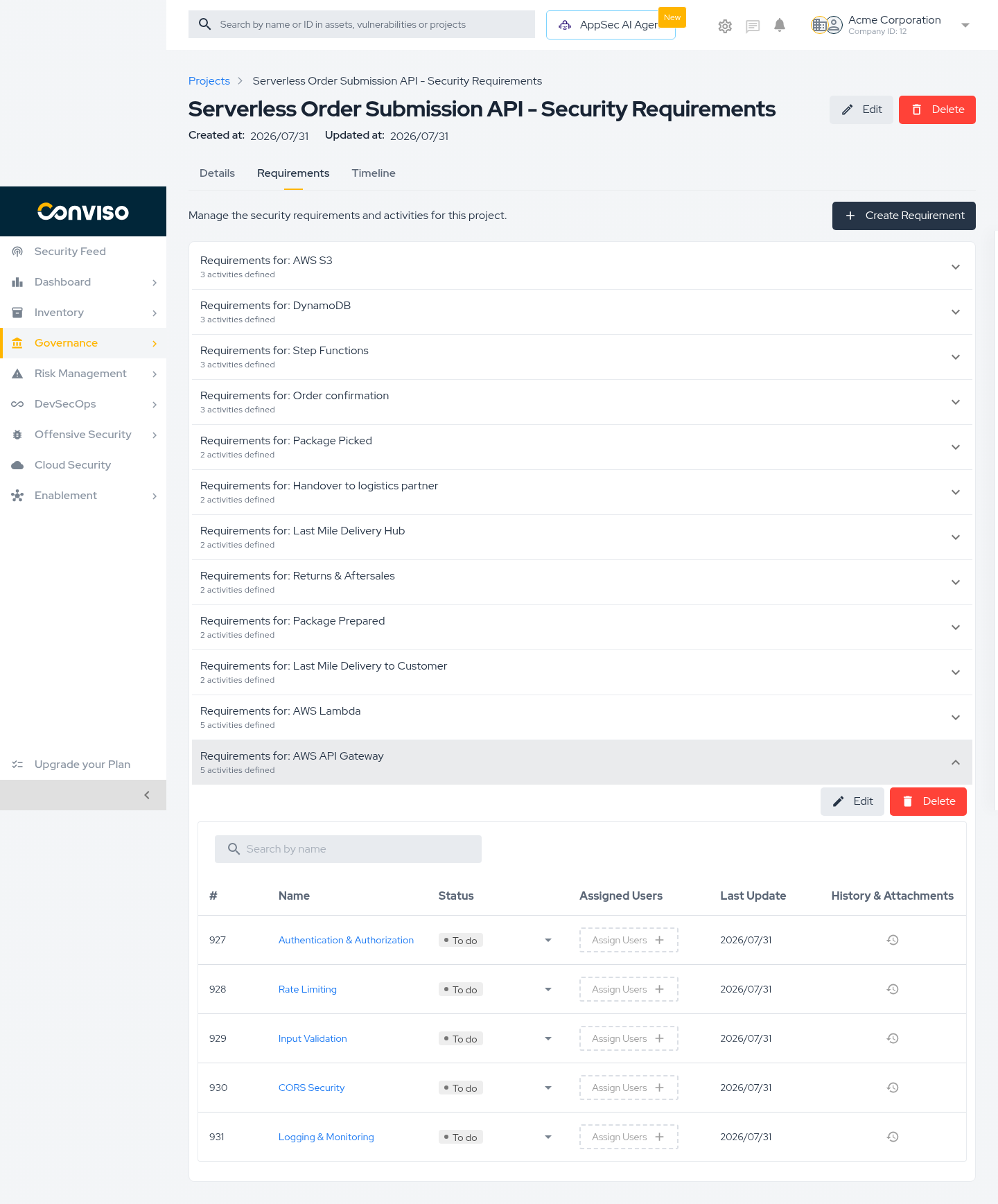
Each group corresponds to one part of your architecture and shows how many activities it contains. Expanding it reveals the activities, each with a name, status, assigned users, last update, and history with attachments.
Step 3 – Work through the activities
For each activity:
- Confirm whether it applies to your system.
- Assign it to whoever will do the work.
- Move it to Running when work starts.
- When finished, move it to Done and attach the evidence.
- If it does not apply, mark it Not Applicable and record the justification.
| Status | Use it when |
|---|---|
| To do | Not started. Every activity begins here. |
| Running | Work is in progress. |
| Done | Implemented, with evidence attached. |
| Not Applicable | Does not apply to your system. Always justify. |
| Not According | Reviewed and found not to meet the requirement. |
Attach evidence while the work is fresh — a screenshot, a configuration excerpt, or a link to a pull request. It is what turns "we handled it" into something you can prove later.
Validation
| Check | Expected result |
|---|---|
| After creating the project | You are redirected to Projects and the new project is listed. |
| Project Details | Project Type is Threat Modeling. |
| Requirements tab | Shows one group per architecture item from the model. |
| Expanding a group | Lists its activities, each starting at To do. |
Troubleshooting
| Problem | What to do |
|---|---|
| This field is required on submit | Start date, End date, Goal, and Scope and limitations are mandatory. Dates only accept values from the calendar. |
| The Requirements tab is empty | The version used had no requirement groups. Generate a new version and create the project again. |
| A requirement group is missing | It was removed from Requirement Templates during creation. Add it with Create Requirement, or create a new project from the artifact. |
| The requirements do not reflect the current architecture | The project was created from an older version. Generate a new version and create a project from it. |
Next steps
- Read the Artifact and Its Versions
- Project Management / Process
- Project Management / Workflow Status
- Requirements
Support
Should you have any questions or require assistance while using the Conviso Platform, feel free to reach out to our dedicated support team.
Contribute to the Docs
Found something outdated or missing? Help us improve the documentation with a quick suggestion or edit.
How to contributeResources
By exploring our content, you'll find resources that will enhance your understanding of the importance of a Security Application Program.
Conviso Blog: Explore our blog, which offers a collection of articles and posts covering a wide range of AppSec topics. The content on the blog is primarily in English.
Conviso's YouTube Channel: Access a wealth of informative videos covering various topics related to AppSec. Please note that the content is primarily in Portuguese.