Conviso Platform for JetBrains IDEs
Objective
Use Conviso Platform in a supported JetBrains IDE to review security data, analyze code with AI assistance, and run local repository scans without leaving the IDE.
Prerequisites
- A supported JetBrains IDE version (see Supported IDEs)
- A Conviso Platform account with access to the required company
- A Conviso Platform API token
- An open project
- Docker installed and running to use local SAST, SCA, or AST scans
AI features depend on the capabilities enabled for your Conviso Platform account.
Supported IDEs
The Conviso Platform plugin supports the following JetBrains IDEs and minimum versions:
| IDE | Minimum version |
|---|---|
| Android Studio | Ladybug | 2024.2.1 |
| CLion | 2024.2 |
| Code With Me Guest | 1.0 |
| DataGrip | 2024.2 |
| DataSpell | 2024.2 |
| GoLand | 2024.2 |
| IntelliJ IDEA | 2024.2 |
| IntelliJ IDEA Community | 2024.2 |
| JetBrains Client | 1.0 |
| JetBrains Gateway | 2024.2 |
| MPS | 2024.3 |
| PhpStorm | 2024.2 |
| PyCharm | 2024.2 |
| PyCharm Community | 2024.2 |
| Rider | 2024.2 |
| RubyMine | 2024.2 |
| RustRover | 2024.2 |
| WebStorm | 2024.2 |
Install the Plugin
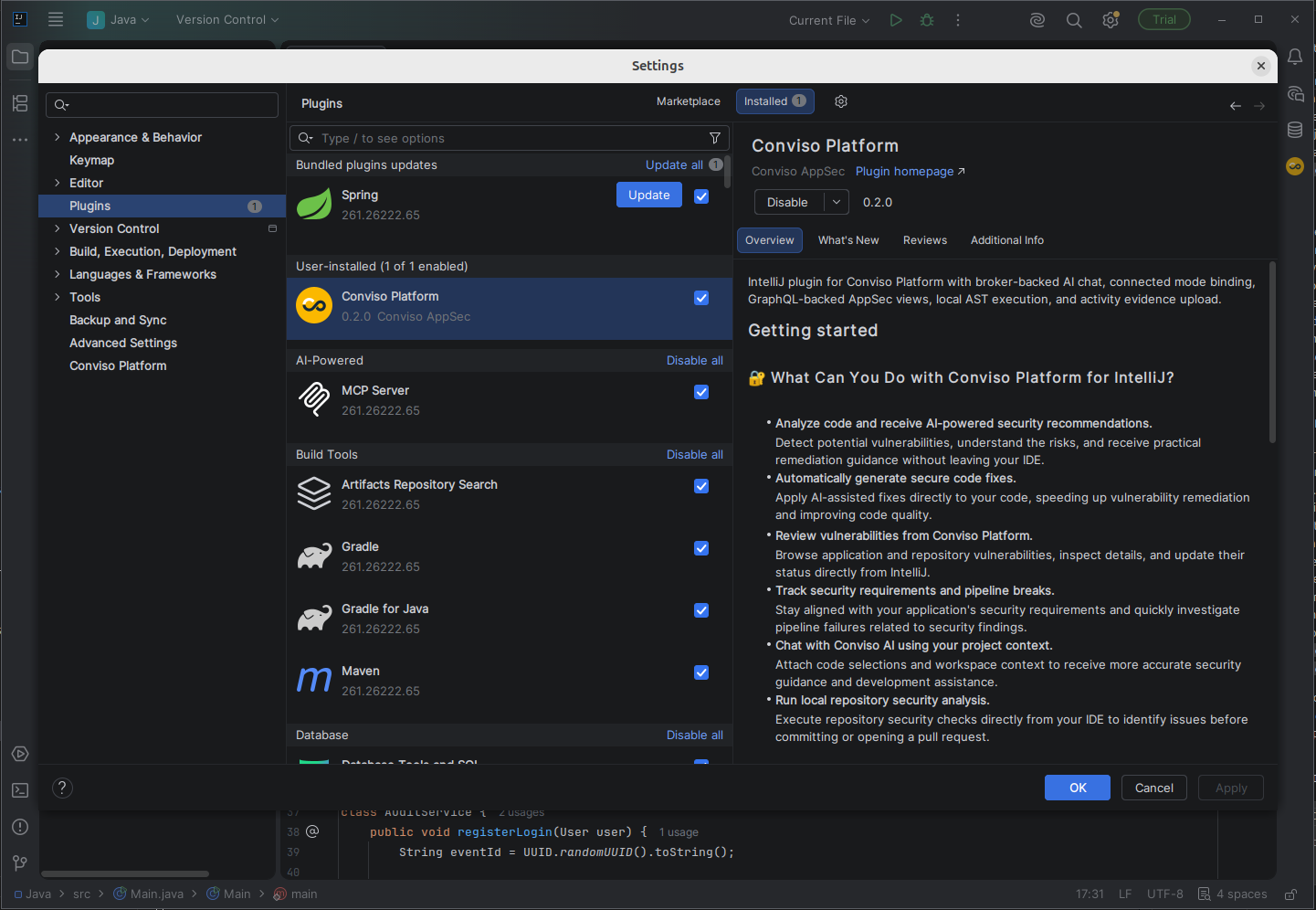
- Open Settings > Plugins.
- Select Marketplace.
- Search for Conviso Platform.
- Click Install.
- Restart the IDE if prompted.
Configure Access
- Open Settings > Conviso Platform.
- Enter your API Token.
- Select a company from the Company ID list.
- Click Test API.
- Click Apply.
- Open Tools > Conviso Platform > Open Conviso Platform.
The API token is stored in the JetBrains Password Safe. Use Check AI Access in the settings page to confirm whether AI capabilities are available for the selected company.
Use Conviso Platform
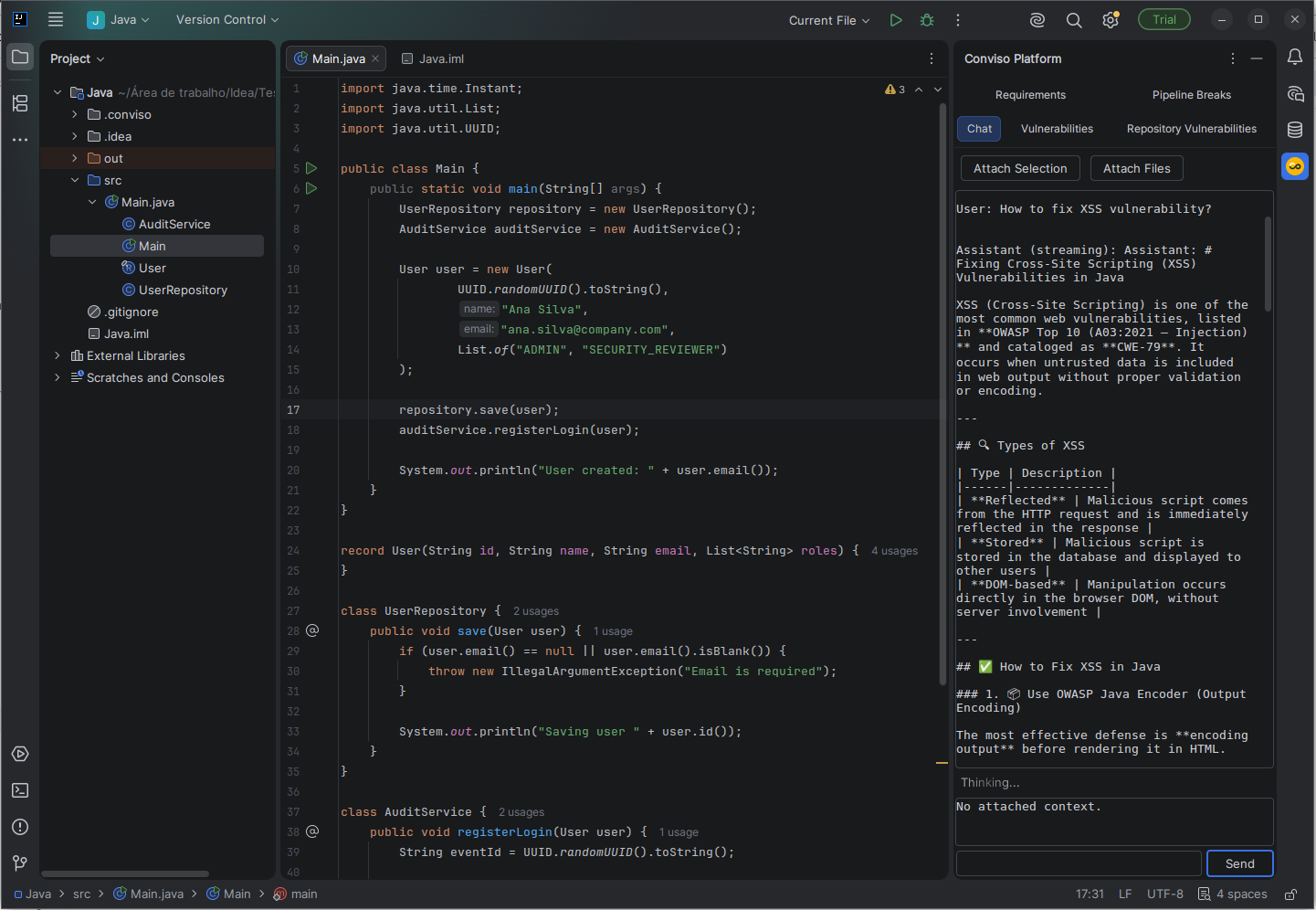
The Conviso Platform tool window provides:
- Chat — ask security questions, attach a code selection or files, search for similar issues, analyze selected code, and review suggested fixes.
- Vulnerabilities — filter findings by asset or title, inspect details, generate an AI-assisted fix, and update status.
- Repository Vulnerabilities — review findings from the latest local repository scan.
- Requirements — browse projects, requirements, and activities; update statuses and add evidence to an activity.
- Pipeline Breaks — review failed security gate executions and their failure reasons.
Double-click an item in a list to open its detailed information.
Analyze Selected Code
- Select the relevant code in the editor.
- Open Tools > Conviso Platform.
- Select Analyze Security and Suggest Fix.
- Review the response in the Chat tab.
- Click Apply Suggested Fix only after reviewing the proposed code.
- Confirm the replacement.
Run a Local Repository Scan
- Confirm Docker is running.
- Open the repository as a project in your JetBrains IDE.
- Open Tools > Conviso Platform.
- Select Run Repository SAST, Run Repository SCA, or Run Repository AST.
- Open the Repository Vulnerabilities tab to review the detected issues.
Local scans run as dry runs and do not upload a new scan result to Conviso Platform.
Validation
- Test API succeeds and the company list contains the expected company.
- The tabs load data for the selected company.
- A local scan populates Repository Vulnerabilities.
Troubleshooting
Platform Data Does Not Load
Open Settings > Conviso Platform, confirm the API token and company, and run Test API again.
Contribute to the Docs
Found something outdated or missing? Help us improve the documentation with a quick suggestion or edit.
How to contributeResources
By exploring our content, you'll find resources that will enhance your understanding of the importance of a Security Application Program.
Conviso Blog: Explore our blog, which offers a collection of articles and posts covering a wide range of AppSec topics. The content on the blog is primarily in English.
Conviso's YouTube Channel: Access a wealth of informative videos covering various topics related to AppSec. Please note that the content is primarily in Portuguese.