Scan Configs
Scan Configs is where you define how a scan runs, separately from when it runs and what it found. One configuration is stored per asset and per scan type, and every execution — manual, scheduled, or triggered by your pipeline — reuses the closest matching configuration.
Edit a configuration once, and the next run picks it up. You never have to re-declare scanner options inside your CI/CD files.
The Scans context
Everything lives under DevSecOps → AST in the side menu, which opens a context with three tabs:
| Tab | What it holds |
|---|---|
| Executions | Every scan that already ran, with status, duration, asset, and branch |
| Scan Configs | The saved configurations — one row per asset/type, plus one row per AST branch profile |
| AST defaults | The company-wide AST baseline that every asset inherits from |
The configuration model
Three levels resolve from most specific to most general. A scan always uses the closest one that exists:
- Company AST defaults — the baseline for the whole company. Managed in the AST defaults tab.
- Asset configuration — overrides the defaults for one asset. Applies to every branch that has no profile of its own.
- Branch execution profile — overrides the asset configuration for one specific branch. A release branch and a feature branch rarely need the same scan.
Inheritance is per module, not all-or-nothing. An asset can override SAST while still inheriting SCA, IaC, Container, SBOM, and Secret from the company defaults.
Overriding is a deliberate act. Creating a configuration does not copy the defaults into it — the modules you do not touch stay linked to the defaults, so a later change to the company baseline still reaches them.
Reading the list
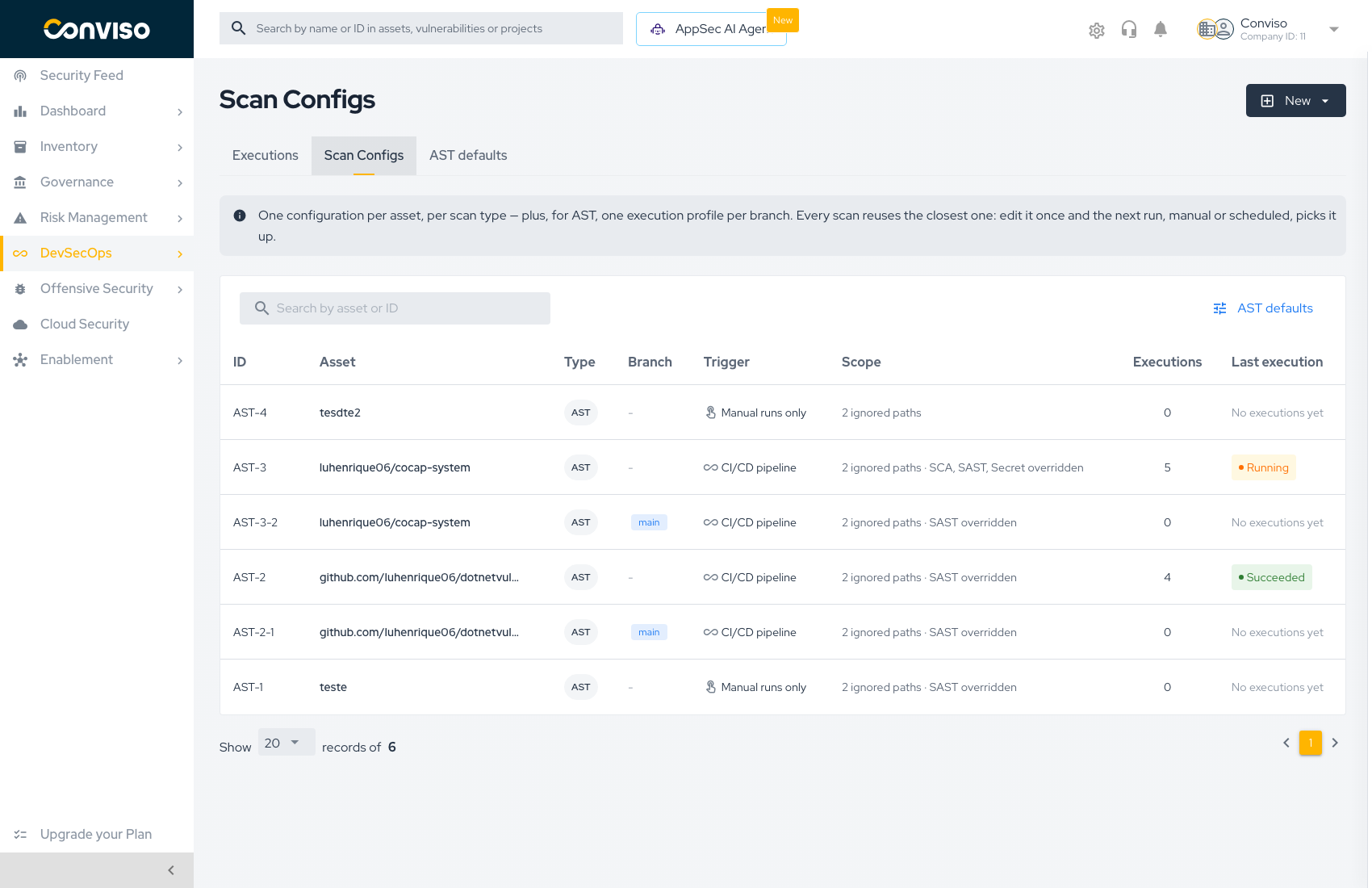
Each row is one configuration.
| Column | Meaning |
|---|---|
| ID | Stable identifier. AST-3 is the asset configuration; AST-3-2 is a branch profile derived from it |
| Asset | The asset the configuration is attached to |
| Type | AST or DAST |
| Branch | The branch for a branch profile; - when the configuration covers every branch |
| Trigger | How this configuration gets executed — see below |
| Scope | What narrows the scan: ignored paths, plus which modules are overridden |
| Executions | How many scans have used this configuration |
| Last execution | Status of the most recent run, or No executions yet |
Trigger kinds
| Trigger | Meaning |
|---|---|
| CI/CD pipeline | Your pipeline (or the AST Orchestrator) starts the scan |
| Scheduled | The Platform starts the scan on a recurring schedule — DAST only |
| Manual runs only | The scan runs when someone presses Run scan or Save and Run |
The trigger is derived, not chosen from a dropdown. It reflects how the asset is actually wired: an asset connected to a repository integration with an orchestrator reads as CI/CD pipeline; a DAST configuration with scheduling enabled reads as Scheduled; anything else reads as Manual runs only.
What each scan type configures
AST covers six modules, each configured independently:
| Module | Analyzes |
|---|---|
| SAST | Your own source code |
| SCA | Third-party dependencies |
| IaC | Infrastructure-as-code misconfigurations |
| Container | OS-level vulnerabilities in container images |
| SBOM | Software Bill of Materials generation |
| Secret | Credentials and secrets committed to the repository |
DAST configures a single dynamic analysis against a running application or API: scan profile, analysis type, scope, authentication, and schedule.
Access requirements
| Requirement | Applies to |
|---|---|
AST_SCAN_ACCESS plan permission | The whole AST experience, including the AST defaults tab |
| Company Admin profile | Creating, editing, and deleting AST configurations and rules |
| Asset visibility | Starting a scan from an asset you can already see |
Reading and editing AST configuration requires an Admin profile in that company. Starting a scan on an asset you can already see does not.
Where AST is documented
AST spans three concerns, and each has its own home in these docs. Start from the one that matches what you are doing:
| You want to | Read |
|---|---|
| Configure what a scan does, in the Platform | This section — Scan Configs |
| Understand the scanner itself, or run it from a terminal | Conviso AST (CLI), under Scanners |
| Wire your repository provider so the Platform can trigger scans | The AST Orchestrator guide for your provider, under Integrations → Source Code Management: GitHub · GitLab · Azure DevOps · Bitbucket |
The orchestrator guides live with their provider integration because they are provider setup, not scan configuration — you follow one of them once, then never again.
Where to go next
- Creating Scan Configs — build an AST or DAST configuration from scratch
- AST Defaults — set the company-wide baseline
- AST Rules — enable, disable, and create SAST rules
- Running Scans — manual and automated execution flows
Contribute to the Docs
Found something outdated or missing? Help us improve the documentation with a quick suggestion or edit.
How to contributeResources
By exploring our content, you'll find resources that will enhance your understanding of the importance of a Security Application Program.
Conviso Blog: Explore our blog, which offers a collection of articles and posts covering a wide range of AppSec topics. The content on the blog is primarily in English.
Conviso's YouTube Channel: Access a wealth of informative videos covering various topics related to AppSec. Please note that the content is primarily in Portuguese.