GitLab AST Orchestrator
The Conviso Platform GitLab AST Orchestrator runs Conviso AST from one GitLab project (the orchestrator). Application projects do not need a Conviso CI file.
When an eligible merge request is merged, Conviso triggers a pipeline on the orchestrator and passes the target repository and branch. The job obtains a short-lived clone credential from the Platform (using your API key), clones the target repository, runs conviso ast run, and sends findings to the mapped asset.
You do not store a GITLAB_TOKEN or other clone PAT on the orchestrator — only CONVISO_API_KEY.
How it works
What Conviso checks before dispatching:
- The event is a merge request that was merged.
- AST scans on merge is enabled on the GitLab integration.
- The repository is an imported asset that is enabled.
- The MR target branch matches the configured merge target (see Merge target branch below).
The pipeline always appears on the orchestrator project (not on the application project).
Execution costs: Pipelines run on your GitLab runners and consume your CI minutes.
Before you begin
Work in this order: GitLab setup first, then Conviso Platform.
You need:
- GitLab ALM integration connected (OAuth).
- At least one application project imported as an asset and enabled.
- A dedicated orchestrator project (or an empty project you will use only for this). Example / template: convisoappsec/pipeline-orchestrator.
- Permission to set CI/CD variables and create pipelines on the orchestrator (see Pipeline variables policy).
- A Conviso API key for the same environment you will scan against (production or staging). Its profile needs Integrations → Manage and Write results to the platform; an Admin has both. See Required permissions.
| Term | Exact meaning |
|---|---|
| Orchestrator project | GitLab project that contains .gitlab-ci.yml. Conviso triggers this project only. |
| Target repository | Application project imported as an asset. It must not rely on a local Conviso CI file for this flow. |
| Ref | Branch or tag of the orchestrator where GitLab loads .gitlab-ci.yml when Conviso creates the pipeline. |
| Merge target branch | The MR target branch on the target project that is allowed to trigger a scan (for example main). See below. |
| Asset | Imported repository in Conviso (group/project path) where findings are stored. |
Merge target branch
Conviso compares the merged MR’s target branch to:
- The asset’s configured AST / branch mapping, if set; otherwise
- The integration Ref (
orchestrator_ref/ pipeline ref).
| Configuration | What triggers a scan |
|---|---|
Asset branch = master, Ref = main | Only merges into master on that asset |
Asset branch empty, Ref = main | Only merges into main on that asset |
| Asset branch empty and Ref empty | No branch filter (any target branch can trigger). Prefer setting Ref explicitly. |
Ref is still the orchestrator branch that holds .gitlab-ci.yml. It is reused as the default merge-target filter when the asset has no branch of its own. Those are two roles of the same field — do not confuse “where the CI file lives” with “any branch on the target”.
Part 1 – GitLab setup
Step 1 – Create the orchestrator project
- Create a GitLab project (recommended name:
conviso-ast-orchestrator), or copy from convisoappsec/pipeline-orchestrator and keep only.gitlab-ci.yml. - Choose the branch that will contain the CI file (almost always
main). That value is what you will set as Ref in Conviso.
Step 2 – Create the CONVISO_API_KEY variable
In the orchestrator project (not the target):
- Open Settings → CI/CD → Variables.
- Create:
| Name | Flags | Required |
|---|---|---|
CONVISO_API_KEY | Masked | Yes |
Use the API key for the same Conviso environment as the Platform you configured (production vs staging).
Only mark the variable as Protected if the orchestrator Ref branch is a protected branch. Otherwise GitLab does not inject the variable and the job fails without an API key.
CI/CD variable CONVISO_API_KEY under Settings → CI/CD → Variables.
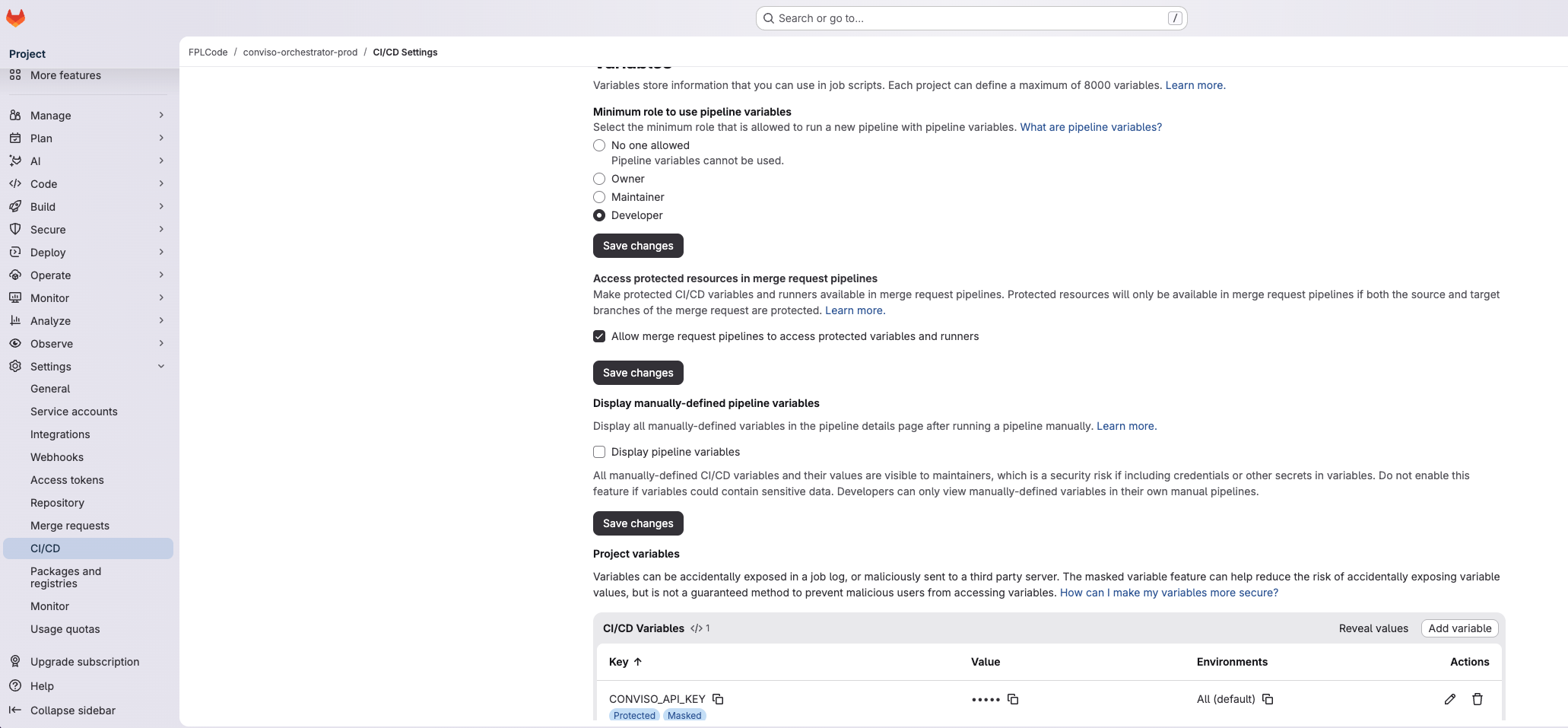
You may add CONVISO_COMPANY_ID. The pipeline uses it only when the company_id input is empty (typical for a manual Run pipeline). When Conviso dispatches after a merge or Run AST, it sends company_id in the variables, so this fallback is not required for Platform-triggered runs.
Do not create a GITLAB_TOKEN for clone. The job calls conviso-ast-repository-token --provider gitlab, and the Platform returns the GitLab integration’s OAuth credential for that run.
Step 3 – Add .gitlab-ci.yml
Public template: convisoappsec/pipeline-orchestrator
CI file: .gitlab-ci.yml
On the orchestrator branch you will set as Ref (usually main):
- Create
.gitlab-ci.ymlat the project root. - Paste the YAML below (or copy it from the example repo).
stages:
  - scan

run-ast-scan:
  stage: scan
  image:
    name: convisoappsec/convisoast:latest
    entrypoint: [""]
  rules:
    - if: '$repo_full_name && $branch'
  variables:
    GIT_STRATEGY: none
  script:
    - export CONVISO_API_KEY="$CONVISO_API_KEY"
    - |
      export CONVISO_API_URL="${api_url:-https://api.convisoappsec.com}"
      CONVISO_API_URL="${CONVISO_API_URL%/}"
      case "$CONVISO_API_URL" in
        https://app.convisoappsec.com)
          export CONVISO_API_URL="https://api.convisoappsec.com"
          ;;
        https://staging.convisoappsec.com)
          export CONVISO_API_URL="https://api.staging.convisoappsec.com"
          ;;
      esac
    - export CONVISO_REPO_FULL_NAME="$repo_full_name"
    - |
      case "${asset_id:-}" in
        ""|none|0) unset CONVISO_ASSET_ID || true ;;
        *) export CONVISO_ASSET_ID="$asset_id" ;;
      esac
      case "${scan_run_id:-}" in
        ""|none|0) unset CONVISO_SCAN_RUN_ID || true ;;
        *) export CONVISO_SCAN_RUN_ID="$scan_run_id" ;;
      esac
    - umask 077 && conviso-ast-repository-token --provider gitlab > repo_token
    - |
      git clone --branch "$branch" \
        "https://oauth2:$(cat repo_token)@${CI_SERVER_HOST}/${repo_full_name}.git" target
    - rm -f repo_token
    - cd target
    - export GIT_CONFIG_COUNT=1 GIT_CONFIG_KEY_0=safe.directory GIT_CONFIG_VALUE_0='*'
    - export CONVISO_COMPANY_ID="${company_id:-$CONVISO_COMPANY_ID}"
    - export CONVISO_BRANCH="$branch"
    - conviso ast run --repository-dir . --output "$CI_PROJECT_DIR/conviso-ast-session.zip"
  artifacts:
    when: always
    paths:
      - conviso-ast-session.zip
    expire_in: 1 week
- Commit and push to that Ref branch.
- GitLab CI must clear the image entrypoint with
entrypoint: [""], so the job runs its own script; otherwise it may fail withunrecognized arguments: sh -c .... - This template clones
branch(the MR target branch after merge). Conviso also sendscommit_shaandmr_iid(frompr_number) for correlation.
Pipeline variables policy
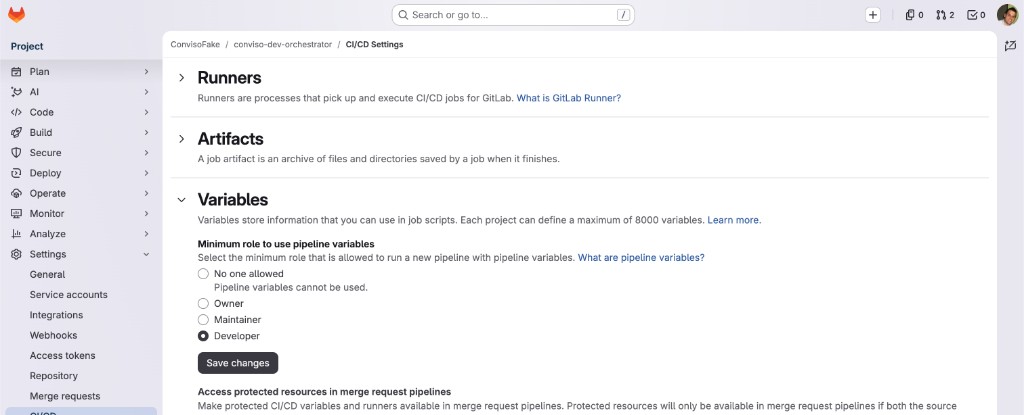
If Conviso fails to trigger with Insufficient permissions to set pipeline variables, open the orchestrator project → Settings → CI/CD → Variables and set Minimum role to use pipeline variables to Developer or Maintainer. The GitLab user connected via OAuth must have at least that role on the orchestrator project.
Minimum role to use pipeline variables set to Developer.
Part 2 – Conviso Platform setup
Step 4 – Configure the orchestrator
- Open Integrations → GitLab → Configuration.
- Turn AST scans on merge on.
- Under Orchestrator pipeline, fill:
- Project ID — numeric GitLab project ID of the orchestrator.
- Ref — orchestrator branch/tag that contains
.gitlab-ci.yml(e.g.main).
- Save.
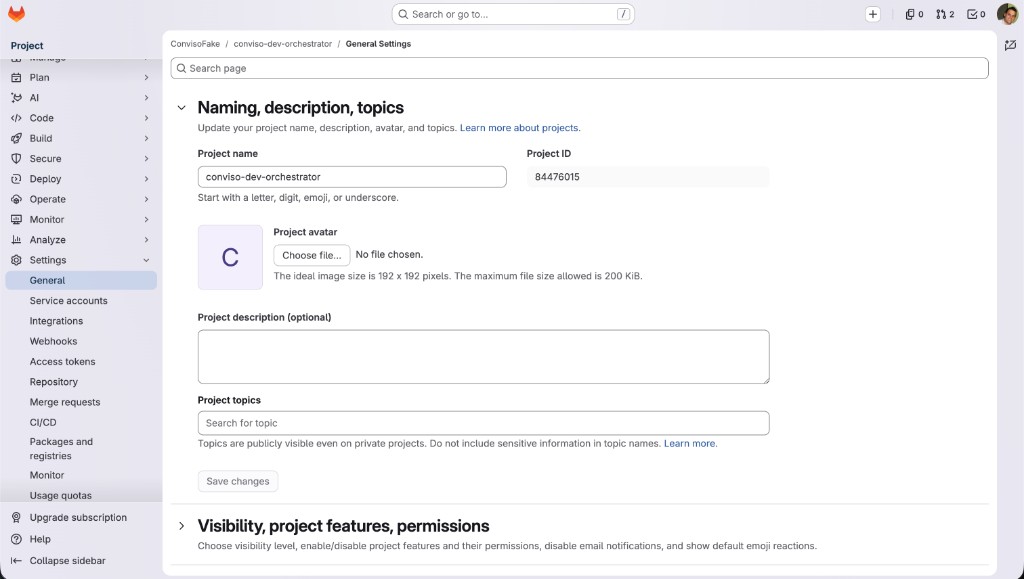
The Project ID is shown in GitLab under the orchestrator project → Settings → General:
Find the numeric Project ID in GitLab General settings.
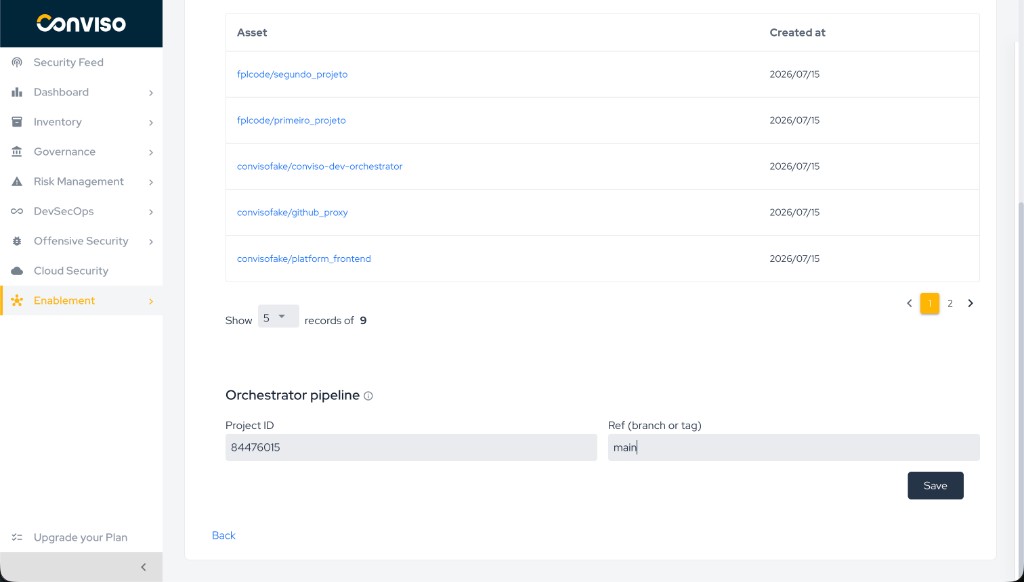
Then paste it into Conviso and set the ref:
Orchestrator pipeline – Project ID, Ref, and Save.
Step 5 – Assets and merge target
- Confirm each application project is imported and enabled.
- Set the asset branch mapping when the merge target is not the same as Ref (example: Ref
mainon the orchestrator, merges intomasteron the asset → map the asset tomaster). - If the asset has no branch mapping, merges must go into the branch named by Ref (or any branch only if Ref is also empty — avoid that setup).
End-to-end flow (after setup)
- Developer merges an MR into the configured merge target on an imported, enabled asset.
- Conviso validates the event and configuration, then creates a pipeline on the orchestrator project / Ref.
- Variables include at least:
repo_full_name,branch(MR target),commit_sha,mr_iid,api_url,company_id,asset_id(blank values may be omitted). - Job steps: issue repository token → clone target at
branch→ runconviso ast run→ upload session artifact. - Findings appear on the asset in Conviso Platform.
- In GitLab, open the orchestrator → Build → Pipelines → job
run-ast-scanto inspect the run.
Validation checklist
| Check | Expected |
|---|---|
| Variable | CONVISO_API_KEY exists on the orchestrator (Masked; Protected only if Ref is protected) |
| Path | .gitlab-ci.yml is on the Ref branch |
| Conviso | Orchestrator Project ID + Ref saved; AST scans on merge on |
| Asset | Target project imported, enabled; merge target branch matches mapping or Ref |
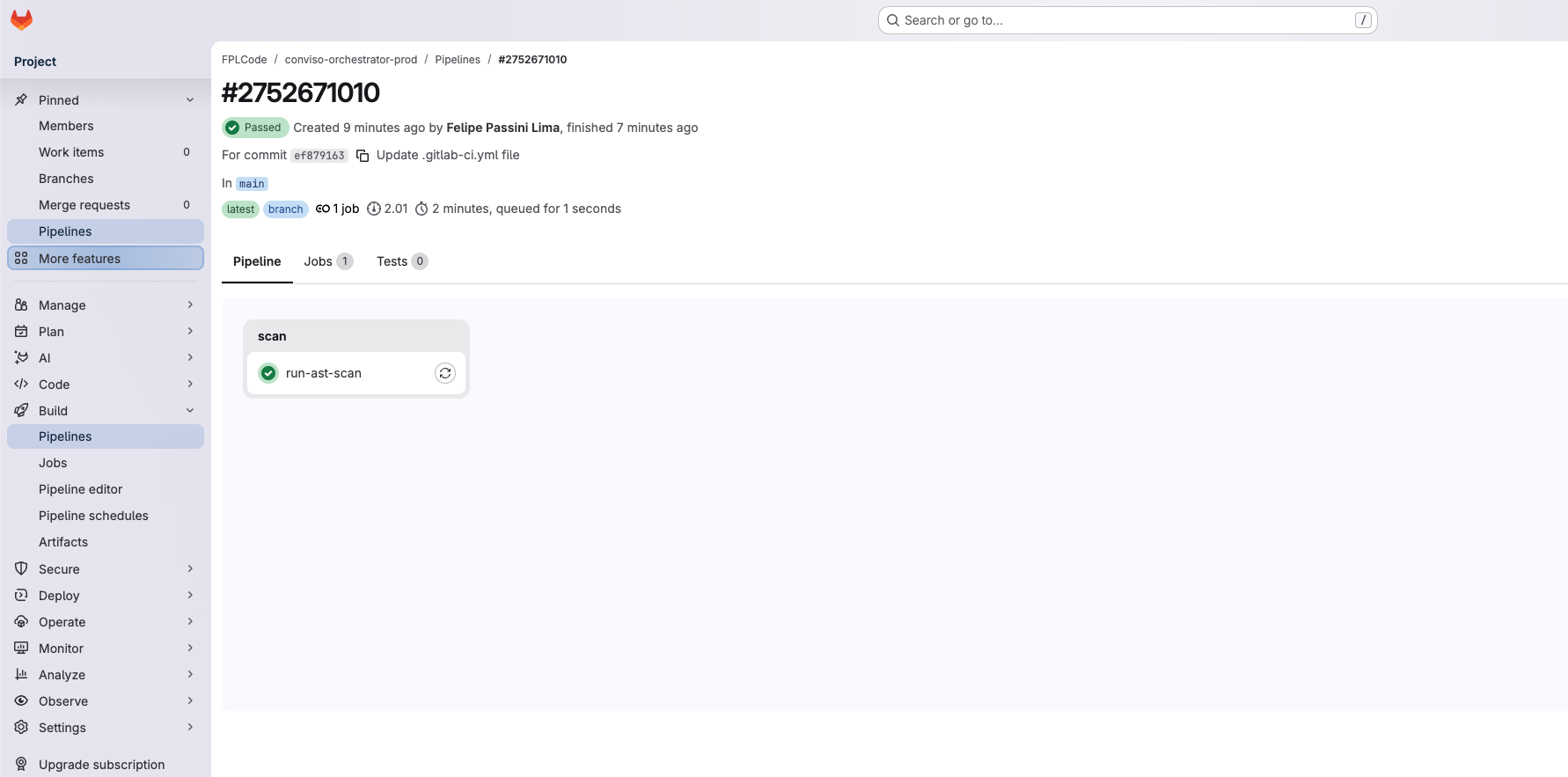
| After merge | New pipeline on the orchestrator with job run-ast-scan; findings (or a clean result) on the asset |
Successful orchestrator pipeline: stage scan, job run-ast-scan Passed.
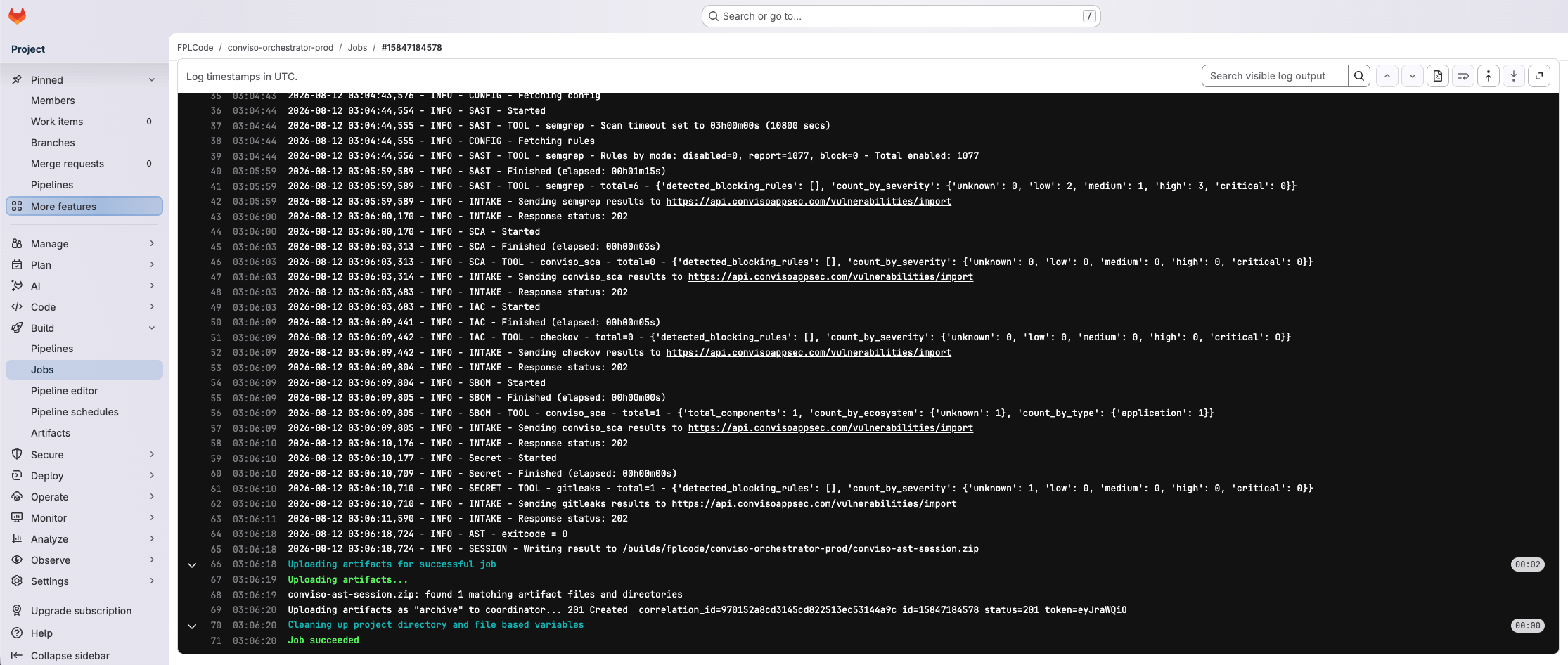
Successful run-ast-scan job log (token → clone → conviso ast run → session artifact).
Manual test (optional): on the orchestrator, Build → Pipelines → New pipeline. Set variables repo_full_name and branch to an imported asset. Leave api_url empty for production (https://api.convisoappsec.com). Set company_id or define CONVISO_COMPANY_ID.
Troubleshooting
| Symptom | Cause / fix |
|---|---|
| Merge done, no pipeline | AST scans on merge off; Project ID/Ref incomplete; asset disabled or not imported; MR target branch ≠ asset branch / Ref |
| Insufficient permissions to set pipeline variables | Set minimum role to Developer/Maintainer (see above) and ensure the OAuth user has that role |
unrecognized arguments: sh -c ... | Missing entrypoint: [""] on the convisoast image |
| Token / clone fails (HTTP 4xx) | repo_full_name not an imported asset for that API key/company; wrong environment (CONVISO_API_KEY vs api_url); GitLab integration not authorized |
CONVISO_API_KEY empty / auth errors on unprotected branch | Variable is Protected but Ref is not a protected branch — uncheck Protected or protect the branch |
| Unreadable / HTML response from Platform | Use the API host (api.*), not app.* / staging.*. The template normalizes those hosts automatically |
Scanner missing CONVISO_COMPANY_ID | Manual run without company_id and without variable CONVISO_COMPANY_ID |
| Wrong code scanned | Merge target / branch mismatch; confirm you merged into the configured target branch |
Related guides
Contribute to the Docs
Found something outdated or missing? Help us improve the documentation with a quick suggestion or edit.
How to contributeResources
By exploring our content, you'll find resources that will enhance your understanding of the importance of a Security Application Program.
Conviso Blog: Explore our blog, which offers a collection of articles and posts covering a wide range of AppSec topics. The content on the blog is primarily in English.
Conviso's YouTube Channel: Access a wealth of informative videos covering various topics related to AppSec. Please note that the content is primarily in Portuguese.